

What is Excel Test?
The Excel test is the tool to measure the knowledge of Excel. Employers usually conduct it during the recruiting process. It aims to test the skill level in Excel as it reduces human work and makes it very easy.
This Excel test provides you with the top 18 frequently asked questions (multiple choice) in basic Excel.
Excel Test Questions and Answers
Following are the few question and answers to the Excel test asked by the employers while recruiting the employees:
1 – What is the shortcut key for the Autosum?
- ALT and =
- CTRL and =
- ALT and S
- CTRL and S
Answer: (a) ALT and =
2 – What is the formula for inserting the Random numbers in excel?
- RAND ()
- RANDBETWEEN (BOTTOM, TOP)
- RANDBETWEEN (TOP, BOTTOM)
- RAND (TOP, BOTTOM)
Answer: (b) RANDBETWEEN (Bottom, Top)
3 – What is the formula for finding the average of numbers?
- AVERAGE (NUMBER1, NUMBER2, NUMBER3, NUMBER….)
- AVERAGE (SUM OF NUMBERS)
- AVERAGE (NUMBER1 + NUMBER 2 + NUMBER 3….)
- AVERAGE (VALUE1, VALUE2, VALUE3…)
Answer: (a) AVERAGE (NUMBER1, NUMBER2, NUMBER3, NUMBER….)
4 – How to find the current date and time in excel?
- Now ()
- Current date ()
- Date time ()
- Today ()
Answer: (a) Now ()
5 – What is a shortcut to insert the table?
- CTRL+S
- CTRL+T
- CTRL+A
- Alt+T
Answer: (b) CTRL+ T
6 – Shortcut for expanding or collapsing the formula bar?
- CTRL+ Alt+ A
- CTRL+ Shift + U
- CTRL+ Alt + U
- Alt+ Shift
Answer: (b) CTRL+ Shift + U
7 – X Co. is looking into three of the potential projects and will accept the project only if the IRR from the project is expected to be 12% or above. What formula shows whether to accept or reject the projects under consideration?
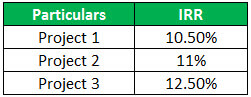
Solution
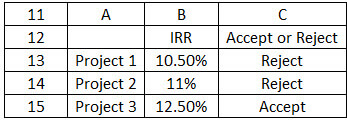
- IF(B$13>12,”accept”,”reject”)
- IF(B13>12,”accept”,”reject”)
- IF(B$13>12,accept,reject)
- IF(B13>12,accept,reject)
Answer: (b) IF(B3>13,”accept”,”reject”)
8 – What is the Formula for Rounding off the Number fully without any decimal?
- =ROUND(NUMBER,0)
- =ROUND(NUMBER,1)
- =ROUND(NUMBER,2)
- =ROUND(NUMBER)
Answer: (a) =ROUND(NUMBER,0)
9 – What is the table tool for evaluating and analyzing the data?
- Pie chart
- Insert Table
- Insert Chart
- Pivot Table
Answer: (d) Pivot Table
10 – What is the formula for calculating EMI in Excel?
- =PMT (rate,nper,pv)
- =PMT (nper, rate, pv)
- =PMVT (rate, nper, pv)
- =PMET (rate, nper, pv)
Answer: = (a) PMT (rate, nper, pv)
11 – A taken Loan of $ 5,00,000 for 5 years, rate of interest is 9% p.a calculate EMI?
- $ 3750
- $ 3820
- $ 3978
- $ 3650
Answer: (a) $ 3750
12 – What is the shortcut to insert the hyperlink?
- CTRL+K
- CTRL+Q
- CRTL+E
- ALT+K
Answer: (a) CTRL+K
13 – What is the shortcut for entering the current time?
- Ctrl + Shift + ;
- Ctrl + Shift + :
- Ctrl + :
- Ctrl + ;
Answer: (b) Ctrl + Shift + :
14 – What is the shortcut for copying the formula from the above row?
- Ctrl + “
- Ctrl + ‘
- Alt + :
- Alt +’
Answer: (b) Ctrl + ‘
15 – What is the shortcut for copying the value from the above cell?
- Ctrl + Shift + “
- Ctrl + “
- Alt + Shift + “
- Alt +’
Answer: (a) Ctrl + Shift + “
16 – What is the shortcut for selecting the entire column?
- Ctrl + Spacebar
- Ctrl + A
- Ctrl + Q
- Alt + Spacebar
Answer: (a) Ctrl + Spacebar
17 – What is the shortcut for activating the previous workbook?
- Ctrl + Shift + Fn
- Ctrl + Shift + Tab
- Ctrl + Shift + Spacebar
- Ctrl + Shift + Capslock
Answer: (b) Ctrl + Shift + Tab
18 – What is the formula used for totaling the numbers?
- Sum (the selected numbers)
- Autosum (the selected numbers)
- Total (selected numbers)
- Calculate (the selected numbers)
Answer: (a) Sum (the selected numbers)
Recommended Articles
This article has been a guide to What Excel Test is and its definition. Here, we discuss the top 18 Excel test questions with answers. You can learn more about it from the following articles: –